

At Scan A Lot, LLC, we understand that your family photos are more than just paper and ink; they are the visual record of your legacy. Whether it’s a candid shot of a backyard barbecue in 1974 or a formal wedding portrait from the turn of the century, these images carry stories that deserve to be preserved for future generations.
However, most of these memories are currently trapped in "the shoebox": the universal storage container for forgotten moments. While the intent is always to "get to them eventually," the reality is that physical prints degrade over time. Colors fade, paper becomes brittle, and environmental factors like humidity can cause irreversible damage.
The transition to a digital library is the best way to ensure these memories remain vibrant and accessible. While our photo scanning service is designed to do the heavy lifting for you, a small amount of preparation on your end can significantly enhance the quality and organization of your final digital collection.
By following these five quick steps, you can save time, protect your originals, and ensure that your new digital archive is as organized as a professional library.
1. Remove Photos from 'Magnetic' Albums Carefully
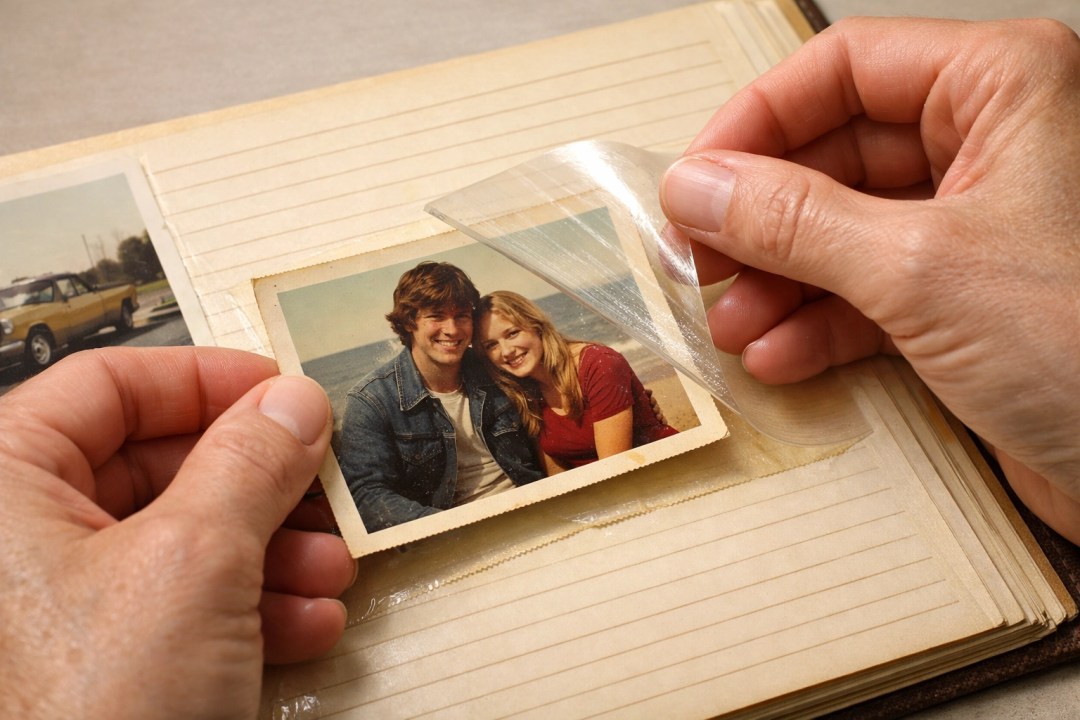
If you grew up in the 1970s, 80s, or early 90s, you likely have several "magnetic" photo albums. These were the albums with the sticky cardboard pages and the clear plastic overlays. Despite the name, there was nothing magnetic about them: they used a strong, often acidic adhesive to hold photos in place.
Over time, that adhesive can bond permanently to the back of your photos. Even worse, the acidity in the glue and the plastic can cause yellowing and "foxing" (brown spots) on your prints. Before bringing your photos in for photo scanning, it is vital to remove them from these albums.
How to do it safely:
Slowly peel back the plastic overlay. If the photo feels stuck, do not yank it. You can often use a thin piece of dental floss to gently "saw" between the back of the photo and the sticky page. If the photo simply won't budge, it’s better to leave it alone and let a professional handle it, but for the majority of your collection, getting them out of these toxic environments is the first step toward preservation.
2. Clear Away the Fasteners: Staples, Clips, and Sticky Notes
In the era of physical prints, it was common to staple a group of photos together or use a paperclip to attach a note to a specific image. While these were helpful organizational tools thirty years ago, they are the enemies of high-speed, high-resolution professional scanners.
Metal fasteners can scratch the delicate glass of a scanner, which results in lines appearing on every subsequent image scanned. Furthermore, sticky notes or tape can leave a residue on the photos themselves or the scanning equipment.
The Prep Task:
Go through your stacks and remove every staple, paperclip, and piece of tape you can find. If a sticky note contains important information (like "Grandma’s 80th Birthday"), don’t throw it away! Instead, write that information on a separate index card to be placed with that specific bundle of photos. This keeps your photos safe and ensures the scanning process remains smooth and efficient.
3. Sort by Decade or Major Event
When you search for "digitalization near me," you aren't just looking for someone to create a folder full of 5,000 files named "IMG_001" to "IMG_5000." You want a digital library that you can actually navigate.
The way you organize your physical photos is exactly how your digital folders will be structured. If you give us a chaotic pile of loose photos, your digital delivery will reflect that chaos. However, if you spend a little time sorting, we can name your folders accordingly.
Simple Sorting Ideas:
- By Decade: 1960s, 1970s, 1980s.
- By Event: "Smith Wedding 1994," "Grand Canyon Trip 2002," "Christmas 1985."
- By Person: "Baby Photos – Sarah," "Dad’s College Years."
When your photos are sorted, the transition to a scan to digital format becomes a powerful tool for storytelling rather than just a storage solution.

4. Face All Photos in the Same Direction
This is a small step that makes a massive difference in the speed of the project. When photos are oriented in the same direction (all tops facing up, all facing forward), the scanning technician can work through the stacks with precision.
While modern software can rotate images, starting with a consistent orientation helps maintain the integrity of the scan and ensures that your digital files come back ready to view without you having to manually rotate hundreds of landscape shots that were scanned as portraits.
The Professional Touch:
When we receive a neatly oriented stack, it allows our team to focus more time on color correction and quality control rather than just mechanical alignment. It’s a simple way to help us give you the best possible result.
5. Use Ziplock Bags or Envelopes for Grouping
Once you have your photos sorted by decade or event and oriented correctly, you need a way to keep those groups separated during transport. The best way to do this is by using common household items like Ziplock bags or envelopes.
Why this works:
- Protection: It keeps dust and moisture away from the prints.
- Organization: You can use a permanent marker to write the folder name directly on the bag (e.g., "Folder 1: Europe Trip 1991").
- Stability: It prevents the stacks from sliding around and getting mixed up in the box during transit to our facility.

By handing us a box filled with labeled bags, you are essentially providing the "map" for your digital legacy. We will follow your labels exactly, creating a digital mirror of your physical organization.
Why Professional Scanning Matters
You might be tempted to try a DIY approach using a home all-in-one printer/scanner. While this works for one or two photos, it is incredibly time-consuming for a library of hundreds or thousands. More importantly, consumer-grade scanners often lack the optical resolution and color depth required to truly capture the nuances of an old photograph.
At Scan A Lot, LLC, we use industrial-grade equipment designed to capture every detail. Our process includes:
- High Resolution: We scan at higher DPI (dots per inch) settings than standard home units, allowing you to blow up small prints into larger wall art if desired.
- Color Restoration: We can often breathe life back into faded "sepia" or "red-tinted" photos from the 70s.
- Dust Removal: Our equipment and techniques minimize the appearance of surface dust and minor scratches.
If you are also looking to preserve other types of media, such as VHS tapes or audio cassettes, bringing them all to a single professional service ensures consistency across your entire family archive.

The Value of the "Prep"
When you take these five steps, you aren't just doing "work": you are engaging with your history. Many of our clients find that the process of sorting through the shoebox is a wonderful trip down memory lane. It’s a chance to see how much the kids have grown, to remember the style of your first car, and to honor the relatives who are no longer with us.
By the time you bring your organized photos to Scan A Lot, you’ll have a clear vision of what your digital library will look like. You’ll know that the wedding photos are in Bag A and the vacation photos are in Bag B. This clarity allows us to provide a faster turnaround and a more accurate final product.
Ready to turn that shoebox into a digital library? A little prep goes a long way in preserving your legacy. Bring your organized photos to Scan A Lot for high-resolution photo scanning today. Visit scanalot.photos to start your project.
#PhotoScanning #ScanToDigital #DigitalizationNearMe #PhotoPrep #FamilyMemories #ScanALot #PhotographyTips #MemoryOrganization #LegacyPreservation
Ready to preserve your own memories? Scan A Lot has been digitizing photos, slides, film, video and audio for Long Island families since 2006 — everything handled in our own West Hempstead lab, never shipped out.
Start with photo and slide scanning, or browse video, photos and slides, 8mm film and audio. Questions? Contact us or call 844-SCAN-PIX.